
Top 5 AI Personal Advisor Apps to Optimise Your Daily Life
You know that feeling when you're stuck on a problem at 11pm and there's no one to ask? Or when you need help writing an email, planning meals for the week, or figuring out what that confusing letter from your insurance company actually means?
Enter AI personal advisors - free apps that act like having an incredibly knowledgeable friend available 24/7. No judgment, no waiting, just instant help with almost anything you can think of.
We've spent the past six months testing every major AI assistant to figure out which ones are actually worth your time. Some are brilliant. Others are overhyped. Here's our honest ranking of the top 5, what makes each one special, and which you should download first.
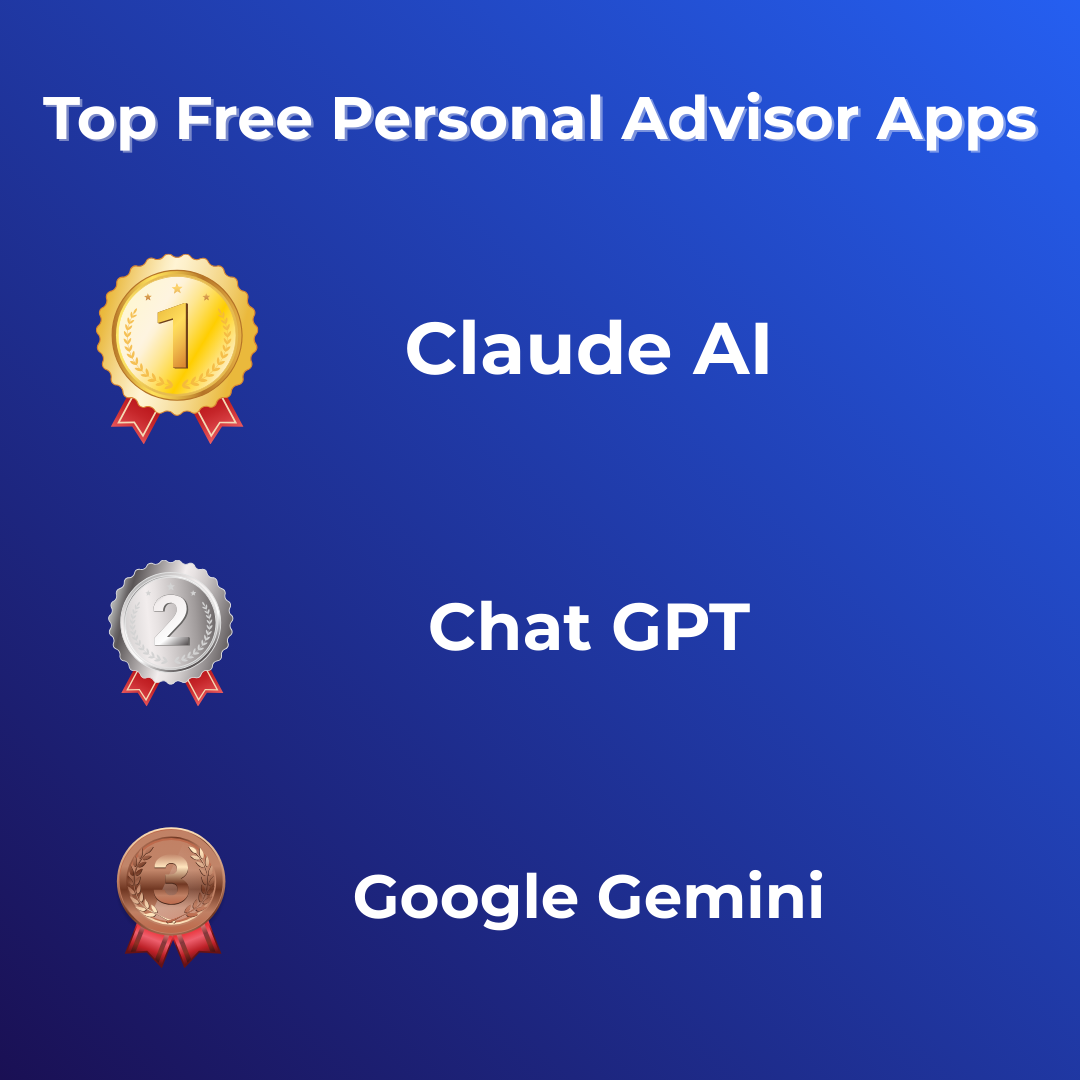
Ranking showing Claude in 1st place, Chat Gpt in 2nd and Google Gemini in 3rd, with medals next to them.
How We Evaluated These AI Advisors
Before we dive into the rankings, here's what we tested for:
Ease of use: Can our non-tech-savvy friends figure it out in 5 minutes?
Response quality: Are the answers actually helpful, or generic nonsense?
Free tier generosity: Does the free version actually work, or is it crippled to force you to pay?
Versatility: Can it handle different types of requests (writing, research, planning, creative work)?
Personality: Does it feel like talking to a helpful person, or a robot?
We gave each tool the same 20 tasks - from writing a tricky email to planning a weekend trip to explaining a complex medical term - and tracked which ones delivered consistently great results.
The Rankings: Top 5 AI Personal Advisors
🥇 #1: Claude (by Anthropic)
Best for: Thoughtful advice, complex problems, and nuanced conversations
A computer screen showing Claude AI.
Claude consistently gave us the most intelligent, well-reasoned responses. When we asked for help with a difficult conversation we needed to have with a colleague, Claude didn't just give us a template - it asked clarifying questions and helped us think through the emotional dynamics.
What makes Claude special:
Responses feel genuinely thoughtful, not just quick and confident
Excellent at understanding context and nuance
Brilliant for writing tasks - it matches tone beautifully
Can search the web for current information
Free tier is genuinely generous (no annoying daily limits)
Best use cases:
Drafting sensitive emails or difficult conversations
Breaking down complex topics into simple explanations
Making decisions when you need to think through pros and cons
Creative writing and content creation
Research and learning
Limitations:
Slightly slower responses than ChatGPT
Less playful/fun than some alternatives
No image generation in free version
Get Claude: Visit claude.ai - no credit card required, just sign up and start chatting.
Rating: 9.5/10
🥈 #2: ChatGPT (by OpenAI)
Best for: Quick answers, creative tasks, and general knowledge
A blue screen with a speech bubble showing ‘GPT’ inside.
ChatGPT is the most well-known AI assistant for good reason - it's fast, versatile, and handles an enormous range of tasks well. The free version is excellent, though you'll hit occasional limits during peak times.
What makes ChatGPT special:
Lightning-fast responses
Huge knowledge base across virtually every topic
Voice mode is genuinely impressive (feels like talking to a person)
Can generate and edit images with DALL-E (paid version only)
Massive ecosystem of custom GPTs for specific tasks (paid version)
Best use cases:
Quick factual questions
Brainstorming and ideation
Coding and technical problem-solving
Creative writing and storytelling
General productivity tasks
Limitations:
Can be overconfident when it's wrong
Free version occasionally unavailable during busy periods
Responses can sometimes feel a bit generic
Get ChatGPT: Download the app or visit chat.openai.com - free tier available, ChatGPT Plus costs £16/month.
Rating: 9/10
🥉 #3: Google Gemini
Best for: Research, current events, and Google ecosystem integration
The Google Logo.
Gemini is Google's AI assistant, and its superpower is seamlessly connecting to Google's search capabilities. If you live in Gmail, Google Docs, and Google Calendar, this integration is incredibly handy.
What makes Gemini special:
Direct integration with Google Search for up-to-date info
Works inside Google Workspace apps (Docs, Gmail, Sheets)
Strong at research and fact-checking
Can analyse images you upload
Improving rapidly (Google is investing heavily)
Best use cases:
Research requiring current information
Finding and summarising information across the web
Working within Google apps
Multilingual translation
Image analysis and description
Limitations:
Responses can feel less polished than Claude or ChatGPT
Personality is more neutral/corporate
Free tier has more restrictions than competitors
Get Gemini: Visit gemini.google.com - free with a Google account.
Rating: 8/10
#4: Microsoft Copilot
Best for: Microsoft users and conversational companionship

Microsoft Logo.
Copilot markets itself as "your companion to inform, entertain, and inspire," and it lives up to that promise. It's particularly strong if you're already embedded in the Microsoft ecosystem (Windows, Office 365, Edge browser).
What makes Copilot special:
Friendly, conversational personality
Integration with Microsoft apps (Word, Excel, PowerPoint) in paid version
Voice conversations feel natural
Good balance of helpful and entertaining
Can be a genuine companion for those feeling isolated
Best use cases:
Windows users who want AI baked into their OS
Conversational support and companionship
Office productivity tasks (if you pay for Microsoft 365 Copilot)
Brainstorming and creative thinking
Lighthearted chat and entertainment
Limitations:
Free version is fairly limited compared to competitors
Best features locked behind Microsoft 365 subscription
Can sometimes feel overly cheerful
Get Copilot: Built into Windows 11 or visit copilot.microsoft.com - free basic version available.
Rating: 7.5/10
#5: Perplexity AI
Best for: Research-heavy questions and finding sources

A black screen with Perplexity AI showing.
Perplexity is the dark horse in this list - less well-known but brilliant for a specific use case. It's designed as an AI-powered research assistant that always shows you its sources.
What makes Perplexity special:
Shows citations and sources for every claim
Excellent for fact-checking and research
Clean, focused interface without distractions
Great for academic or professional research
Genuinely tries to find accurate information
Best use cases:
Academic research
Fact-checking claims you've heard
Deep dives into specific topics
Finding credible sources quickly
Professional research projects
Limitations:
Not as conversational as other options
Less versatile for creative tasks
Smaller user base means fewer online resources/tutorials
Get Perplexity: Visit perplexity.ai - free tier available, Pro version costs $20/month.
Rating: 7/10
Quick Comparison Table
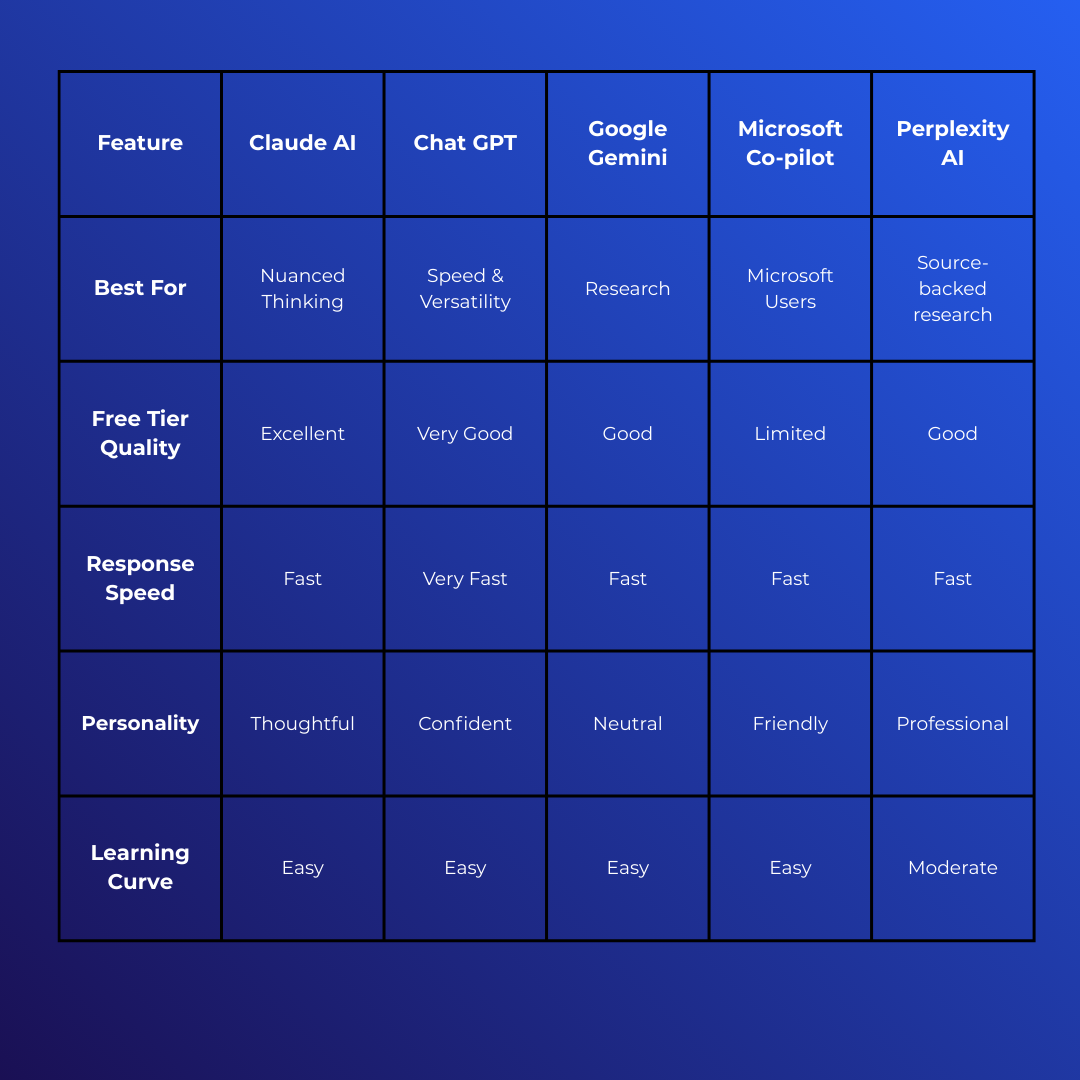
Comparison table of different Personal Assistant AI’s.
Which One Should You Choose?
Here's our honest recommendation based on different needs:
Choose Claude if: You want the smartest, most thoughtful responses and you value quality over speed. Perfect for writers, decision-makers, and anyone dealing with complex or sensitive topics.
Choose ChatGPT if: You want the most versatile, well-rounded AI that handles almost everything well. Great all-rounder for most people.
Choose Gemini if: You're a heavy Google user and want seamless integration with Gmail, Docs, and other Google services.
Choose Copilot if: You're on Windows and want AI baked into your operating system, or you're a Microsoft 365 subscriber who wants advanced Office integration.
Choose Perplexity if: You're doing serious research and need to verify sources for academic or professional work.
But here's the thing: They're all free to try. Download 2-3 and see which "voice" you prefer. You'll quickly develop a sense for which one fits your thinking style.
Tips for Getting the Most from Your AI Advisor
Regardless of which app you choose, here's how to get better results:
Be specific: "Help me write an email declining a meeting" is okay. "Help me write a polite email declining a meeting next Tuesday because I'm overcommitted this month, but I want to suggest reconnecting in March" is much better.
Give context: Let the AI know who you are and what you need. "I'm a small business owner trying to understand tax deductions" helps it tailor responses.
Ask for simplification: If the answer is too complex, just say "explain that like I'm 12 years old" or "give me a simpler version."
Iterate and refine: Don't accept the first response as final. Say "make that shorter," "try a more formal tone," or "give me 3 more options."
Use it for the small stuff: Don't save AI for big problems. Use it for tiny daily questions - that's where it saves the most time cumulatively.
Develop conversational skills: The more you use these tools, the better you'll get at prompting them effectively.
Privacy and Safety Considerations
A quick word on privacy, because it matters:
All of these tools process your conversations to improve their AI. Here's what you should know:
Don't share sensitive personal information: Passwords, financial details, medical records, or anything highly confidential
Anthropic (Claude) has strong privacy commitments: Your chats aren't used to train AI unless you explicitly opt in
OpenAI (ChatGPT) uses chats for training: But you can opt out in settings
Google (Gemini) privacy: Connected to your Google account, review your privacy settings
Microsoft (Copilot) privacy: Similarly connected to Microsoft account
Bottom line: These tools are safe for everyday questions, but treat them like talking in a semi-public space - don't share anything you wouldn't want potentially seen by others.
The Bottom Line
AI personal advisors aren't just hype - they genuinely make daily life easier. The technology is here, it's free, and it works. The only question is: which one will you try first?
Our recommendation? Start with Claude or ChatGPT today. Both have excellent free tiers, both are easy to use, and both will genuinely impress you within the first 5 minutes.
Open one right now and ask it something you've been curious about. Ask it to help with a task you've been putting off. Ask it to explain something you've never understood.
You'll quickly see why millions of people have made AI advisors part of their daily routine.
Ready to get started?
Try Claude: claude.ai
Try ChatGPT: chat.openai.com
Try Gemini: gemini.google.com
Try Copilot: copilot.microsoft.com
Try Perplexity: perplexity.ai
Want more smart tech guides? Subscribe to get weekly tips on using AI and technology to simplify your life.
